Terminal
Smart TP/SL & the Server-Side Risk Engine: Discipline That Runs Without You
Every trader knows their risk rules. Most break them anyway — not from ignorance, but because discipline enforced by willpower alone fails under pressure. AIO Terminal moves the enforcement off your judgment and onto Binance's own servers, so the rules hold even on your worst day.
Why "I'll Just Be Disciplined" Doesn't Work
Research on day traders (Coval & Shumway, 2005) found that traders who lose money in the morning take roughly 16% more risk in the afternoon — at worse prices. A red morning doesn't make people more careful; it makes them chase. Manual stop-loss discipline, manual position sizing, manual "I'll stop trading for today" — all of it is a promise to your future self, made by the same brain that's about to be under stress. AIO Terminal's risk layer doesn't ask you to keep that promise. It enforces it at the order and account level, on Binance's own matching engine where a browser crash or a bad decision can't undo it.
Smart TP/SL: The Trigger Lives on Binance
Smart TP/SL is a two-stage conditional order, and the detail that makes it different from a normal TP/SL is where the trigger actually lives:
- At submit, a partial take-profit order is placed directly on Binance (a native
reduceOnlyorder evaluated tick-by-tick by Binance's own matching engine). A momentary touch of your trigger price fires it — even while AIO Terminal itself is offline. - On the trigger fill, the terminal moves the stop-loss for the remaining position to breakeven (with an optional fee offset), a custom price, or a range — and, in "TP Order" mode, places a fresh take-profit for what's left.
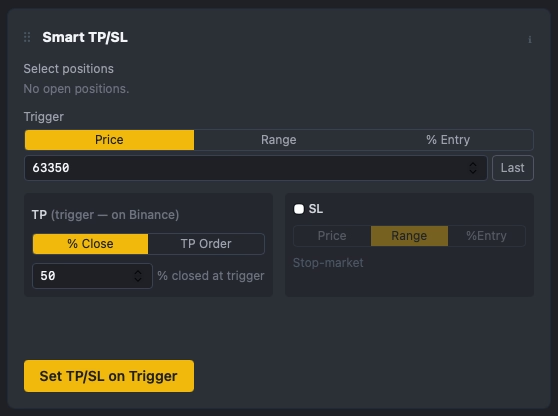
Trigger type can be set in Price (absolute), Range (± from entry), or % Entry — direction is automatic, so a long's take-profit leg fires when mark rises to the trigger and a short's fires when mark falls to it. One rule runs per symbol at a time; re-applying a new rule replaces the old one and its Binance-side order. An already-crossed trigger is rejected with a clear message rather than firing immediately on a stale level. Active rules show live status in the UI — "🟢 on Binance @…" while armed, "⏳ moving SL…" during the breakeven step — so you always know which stage a position is in.
The honest caveat: the partial take-profit fires on Binance regardless of whether your machine is on. The follow-up step — moving the stop-loss to breakeven — is something the app has to actually do, which means it needs to be running. In local (desktop) mode, if your machine is asleep when the trigger fires, that breakeven move happens within seconds of the machine waking up, not instantly. For a position you need protected around the clock with zero gap, deploy AIO Terminal in hosted (always-on) mode.
Trailing Stop: Native, Not Simulated
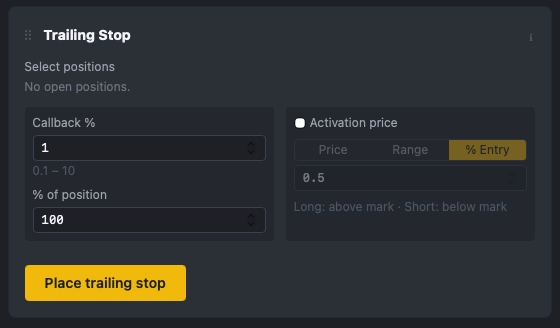
The Trailing Stop tab places a native Binance TRAILING_STOP_MARKET order — fully server-side, exactly like the Smart TP/SL trigger. You set a callback rate (0.1–10%), what percentage of the position it covers, and an optional activation price in Price, Range, or % Entry mode (above mark for a long, below for a short). Once armed, Binance's own engine trails the stop as price moves in your favor. There's no app polling a price feed and racing to update an order — the exit logic runs where the order actually lives.
Risk-% Sizing: One Field Instead of a Calculator
On the Long and Short forms, ticking Risk % auto-sizes your order quantity from a simple formula: quantity = equity × risk% ÷ |entry − SL|. You need an SL set for it to compute anything, which is itself a small forcing function toward always defining your stop before your size. The default risk % is pre-filled from your saved settings, with a computed size and a margin warning shown before you submit — no separate spreadsheet, no mental math under time pressure.
Risk Enforcement: Off, Downsize, or Reject
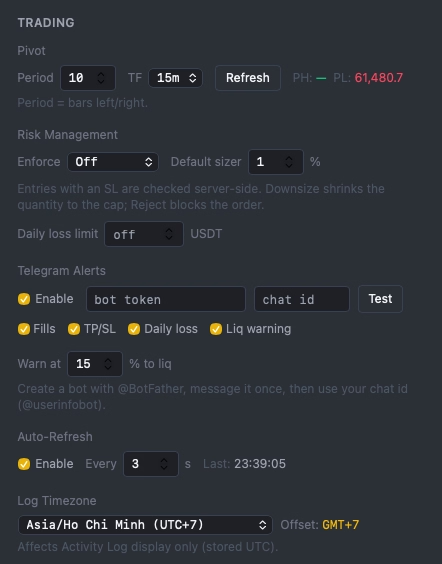
Sizing is only advisory unless something enforces it — so a server-side guard checks every entry that has an SL attached, in one of three modes you choose in Settings:
- Off — no enforcement, sizing is purely informational.
- Downsize — an oversized order is automatically shrunk to your max-risk cap before it's submitted.
- Reject — an oversized order is blocked outright; you have to consciously adjust it to proceed.
The guard is fail-open by design: on an internal metadata read error, it never blocks trading. Risk enforcement is meant to catch a moment of bad judgment, not to become a new point of failure that locks you out of the market.
Daily-Loss Lockout: A Circuit Breaker for Your Worst Day
This is the direct answer to the Coval & Shumway pattern above. You set a daily loss limit in USDT. AIO Terminal accumulates net realized P&L (realized minus fees) per local day, in your chosen timezone. Breach the limit and new entries are blocked until local midnight — but closing positions, canceling orders, adjusting TP/SL, and FLATTEN are never blocked, because none of those actions can add new risk. An 80% warning fires once per day before the hard lockout, and you can enable auto-flatten on breach if you want the terminal to close everything the moment the limit is crossed rather than just stopping new entries. Raising the limit in Settings unblocks you immediately — the gate is dynamic, not a hard-coded restart requirement. A daily-PnL chip stays visible in the header, and a red banner appears the moment the limit is breached, so there's no ambiguity about your state.
Liquidation Monitor
On every mark-price tick, AIO Terminal checks each open position's distance to its liquidation price. Cross your chosen threshold and it fires a warning — Telegram and in-app — with hysteresis so a single tick back and forth across the line doesn't spam you (it re-arms once you're 3% further from danger, or after 10 minutes). The positions table always shows a live liquidation-distance % column, so the number is visible before you ever need the alert.
Panic FLATTEN: One Button, Whole Account
When something breaks fast — news, a flash crash, a connectivity scare — the red FLATTEN button in the header cancels every open order (including algo orders, TP/SL, and trailing stops) and market-closes every open position across every symbol, in one confirmed action. It is deliberately never blocked by the daily-loss lockout, because reducing risk should never be the thing your own risk system prevents you from doing.
How the Pieces Fit Together
None of these tools replace your strategy or your judgment on entries. What they replace is the part of trading that shouldn't depend on willpower in the moment: whether your stop actually gets placed, whether a winning trade gets protected at breakeven without you watching it, whether a bad morning turns into a worse afternoon, and whether you can get flat instantly when you need to. The trigger for the parts that matter most — the stop-loss, the trailing exit, the daily lockout — lives on Binance or on the server, not in a browser tab that might be closed at the worst possible moment.
Getting Started
Smart TP/SL is on keyboard shortcut 8; Trailing Stop has no default key (bind one in Settings). Risk Enforcement, the daily-loss limit, and the liquidation-warning threshold all live in Terminal Settings → Trading → Risk Management. All settings are saved automatically and persist across sessions.
If you're new to AIO Terminal, access is included free with any VIP plan. Contact us on Telegram (@nguyenthl) after subscribing to receive your terminal credentials.
Note: Trigger prices fire on Binance's matching engine, but the resulting order still executes as a market order — meaning normal market slippage applies, the same as any exchange. No tool can guarantee an exact fill price or eliminate liquidation risk entirely; this is risk management, not a guarantee.