Terminal
AIO Terminal Watchlist & Always-On Alerts: Never Miss a Move Again
You can't watch five charts and a Telegram feed at once. AIO Terminal's Watchlist tab and its always-on alert system exist so you don't have to — a multi-symbol screener that runs on the server, and alert rules that keep working even when your laptop is closed.
The Problem: Good Setups Happen Off-Screen
Most of the time you spend trading is spent watching one symbol you already have an opinion on. Meanwhile, three other pairs on your radar quietly build the exact setup you were waiting for — a funding rate that's stretched to unsustainable levels, an open-interest divergence that signals a squeeze, a price level finally getting tapped — and you find out an hour later, if at all. A single-symbol Analytics tab can't fix that; it wasn't built to watch five things simultaneously, and it stops working the moment you close the browser.
Watchlist: One Screener, Every Symbol You Care About
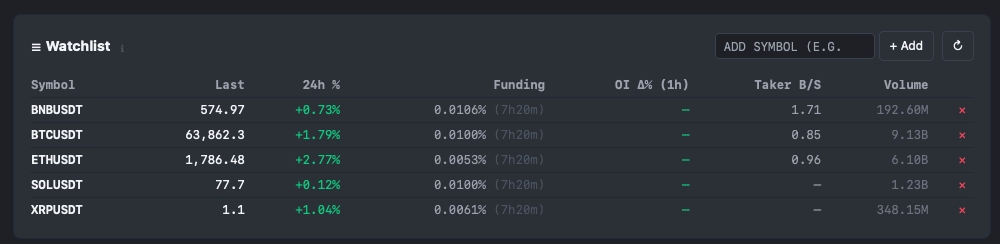
The Watchlist tab is a multi-symbol screener backed by a single shared server-side poller — adding a symbol to your watchlist costs almost nothing in API weight, whether you're tracking 3 pairs or 30. Add or remove symbols freely; sortable columns give you a fast cross-market read:
- Last and 24h % — current price and daily change
- Funding — the current rate, with a live countdown to the next 8-hour settlement
- OI Δ% — open interest change, the same 1-hour-rolling metric used by the Risk Score
- Taker B/S — the account-level taker buy/sell ratio, a fast read of aggressive order flow
- Volume — 24-hour traded volume
Click any row and you jump straight into the Analytics tab on that symbol — the screener is a launchpad into the deeper microstructure tools, not a dead end.
Signal Alerts: Watching Your Active Analytics Symbol
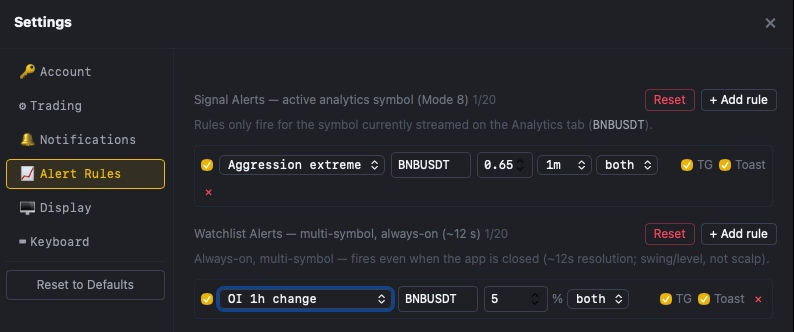
Signal Alerts are rules that evaluate the symbol currently streaming on your Analytics tab — up to 20 rules, each with its own toggle. They fire when the analytics engine itself crosses a threshold you set:
- Aggression extreme — the Aggression Gauge crosses a level you define, in either direction
- CVD divergence — the Spot/Perp CVD divergence crosses a threshold
- Risk score — the composite Risk Score crosses a level
- Funding extreme — funding rate crosses a threshold
- Sweep — a Smart Tape buy or sell sweep is detected
- Price cross — price crosses a level you set
Because these rules read the live analytics engine, they're only active for whichever symbol is currently open in your Analytics tab — precise, but scoped to what you're actively watching.
Watchlist Alerts: The Always-On Layer
This is the part that actually solves the "good setups happen off-screen" problem. Watchlist Alerts run continuously on the server — at roughly 12-second resolution — across every symbol on your watchlist, whether or not the AIO Terminal browser tab is open, and whether or not your laptop is even on. Up to 20 rules, each independently toggled:
- Price level — alert when a symbol crosses a specific price
- OI 1h change — alert on a percentage move in open interest over the last rolling hour
- Funding rate — alert when funding crosses a threshold
- 24h price change — alert on a percentage move over 24 hours
- OI/price divergence — a screener for the same short-covering / quiet-accumulation pattern the Analytics tab's OI quadrant label reads, but running always-on across your whole watchlist instead of one symbol at a time
Each rule can notify via Telegram, an in-app toast, or both. Because these are multi-symbol, swing/level rules rather than scalp-timing tools, the ~12-second resolution is a deliberate trade-off: fast enough to catch a real move, cheap enough to run continuously across dozens of symbols without hammering Binance's API.
Funding Monitor: Know What You're Actually Paying
Funding rate on the Watchlist and Analytics tabs shows you the current published rate — useful for screening, but not the same as what you've actually paid or received on a position you're already holding. The Funding Monitor closes that gap: every 15 minutes it reads the real settled funding on each open position and alerts you when the cumulative cost crosses a percentage of notional that you choose. If you're running a position through several funding cycles, this is the difference between an estimate and an actual accounting of carry cost.
Auto Performance Report: A Digest, Not a Dashboard You Have to Open
The optional Auto Performance Report pushes a daily or weekly summary straight to your Telegram bot on a schedule you set — net P&L, win rate, and your best and worst trade for the period. It's a passive complement to the Journal tab: you don't have to remember to check your stats, they show up on their own.
Setting It Up: Your Own Telegram Bot, No Middleman
All Telegram alerts — fills, TP/SL hits, daily-loss and liquidation warnings, Signal Alerts, Watchlist Alerts, funding cost, and the auto report — route through a Telegram bot you create yourself in about two minutes via @BotFather, then paste the bot token and your chat ID into Terminal Settings → Notifications. There is no intermediary server reading your alerts: the message goes directly from AIO Terminal to your own bot to you. Each event category has its own toggle, so you can enable only what you want.
Practical Setup: A Multi-Symbol Watch Session
- Add your 10–15 most-watched pairs to the Watchlist.
- Set 2–3 Watchlist Alert rules per symbol you're actively considering — typically a price level near your intended entry and an OI 1h change threshold to catch a leverage build-up before it shows up on price.
- Enable Funding Monitor if you're holding positions through multiple funding cycles, with a threshold around 0.5% of notional.
- Turn on the daily Auto Performance Report so your trading stats land in Telegram every morning without opening the Journal tab.
- Keep Signal Alerts reserved for whichever single symbol you're actively trading right now — that's the one where aggression, sweep, and CVD-divergence alerts are most actionable in the moment.
The combination covers both timescales: Signal Alerts for what's happening right now on your active symbol, Watchlist Alerts for what's building across everything else, whether or not you're at your desk to see it.
Getting Started
If you're already an AIO Terminal user, the Watchlist tab has no default keyboard shortcut — bind one in Settings if you check it often, or click it directly in the sidebar. Alert Rules and Notifications both live in Terminal Settings.
If you're new to AIO Terminal, access is included free with any VIP plan. Contact us on Telegram (@nguyenthl) after subscribing to receive your terminal credentials.
Note: Watchlist Alerts and Signal Alerts are advisory notifications, not trade signals or automated orders — they tell you something crossed a threshold you set, nothing more. Combine them with your own analysis before acting.